
Upload your menu. Menuvola AI fills it in. You approve.
No need to type your menu from scratch. AI drafts it, flags what’s missing and suggests the rest. Nothing reaches your menu until you approve it.
- Photo, PDF, Excel or link
- Suggestions with reasons and confidence
- You always have the final say

AI takes on the slowest part of menu setup
Give Menuvola a photo or PDF of your menu, or the link to the QR menu you use today, and AI reads the products, prices and categories. Excel and CSV files import directly. You see the result before anything is saved, and fix whatever needs fixing.
Once the import is done, one screen shows which products are missing ingredients, allergens, calories or a description. For each gap, AI prepares a draft suggestion with its reasoning and a confidence level, so you know how much weight to give it.
You accept, edit or reject every suggestion. Allergen and calorie suggestions are estimates, and a product without ingredients and allergens still can’t go live. AI takes care of the typing and the first draft; every decision on your menu stays with you.
Menuvola AI in four steps
- 01Upload your menuIn the dashboard, open Products → Import. Add up to 4 photos or one PDF, paste your current QR menu’s public link, or drop in an Excel file.
- 02Check the previewProducts, prices and categories land in a preview first. Fix anything misread; matching products get a price update, the rest are added as new.
- 03Let Menuvola AI fill the gapsFrom the missing-info report, one tap opens reasoned suggestions for ingredients, allergens, calories and descriptions. Empty translations can be filled too.
- 04You approveAccept, edit or reject each line. Accepted details never publish a product on their own, and fields you filled in by hand are never overwritten.
What you can do
All of it runs live on Menuvola today; which plan includes it is below.
- Menu from a photo or PDFUp to 4 photos or one PDF. Names, prices and categories are read, plus descriptions, portions and ingredients where printed. Saved only when you confirm.
- Import from another QR menuPaste a public menu link to bring over products, prices, descriptions and categories. Login pages and pages closed to crawlers are skipped; images are never copied.
- Excel and CSV importUpload .xlsx or CSV, or paste from Excel. Matching products get their price updated, new ones are added, all shown in a preview first.
- Missing-info reportSee how many products lack ingredients, allergens, calories or a description, with one tap to suggestions for exactly those.
- Suggestions for missing detailsDraft ingredients, allergens, calories and descriptions, each with its reasoning and confidence level. A rule-based allergen check runs alongside.
- Fill missing translationsFills empty product and category translations in your menu languages without touching existing ones, and suggests copy for promotions.
- Allergen check from ingredientsFlags allergens that may be missing, such as milk in butter. It’s a suggestion only; you decide based on your supplier’s labels.
- Switching from another QR menuShare your current menu’s link or file (PDF, photo or Excel); AI brings everything over for you to check. Only public pages are read.
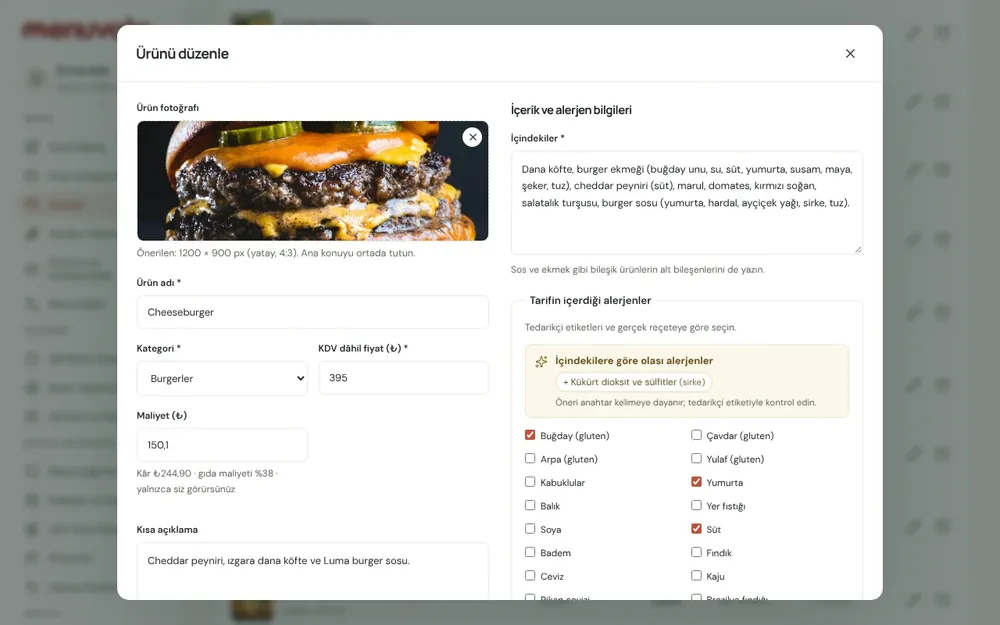
Screenshots show the Turkish interface; the business panel also works in English.
Menuvola AI by plan
AI features are included on every plan: Digital, Professional and Premium. The 14-day free trial includes one menu import (up to 100 products), missing-info suggestions for 100 products and translation of up to 100 products into one extra language.
- DigitalIncluded
You enter the menu yourself, so import and suggestions save the most typing.
- ProfessionalIncluded
Our team handles setup; AI support stays on for every update after.
- PremiumIncluded
No product limit, so large menus gain the most time.
No automatic renewal, no commission on sales. See pricing
Questions you may have.
Will AI write to my menu on its own?
No. Without your approval it adds no information, publishes no product and changes no price. Every result lands in a preview or suggestion list first, and whether a product is live is always your call.
Can I trust the allergen and calorie suggestions?
They are estimates, each shown with its reasoning and confidence level. You know your recipes and suppliers’ labels, so you check every suggestion. The business remains responsible for its menu’s accuracy.
Can I move over from another QR menu system?
Yes. Share the link to your current menu or a PDF, photo or Excel file. Pages behind a login or closed to crawlers aren’t read; use a PDF or photo instead.
Is AI available during the free trial?
Yes, with a set allowance: one import of up to 100 products, suggestions for 100 products and up to 100 product translations into one extra language. Choose a plan and you keep going, with your menu intact.
Works well together
- Allergens and caloriesIngredients, 14 allergens and calories in one panel, with a guest allergen filter, a calorie calculator and a printable allergen chart.See details
- Multilingual menuChoose as many of 18 languages as your plan allows; guests read the menu in their own language, and your printed materials follow.See details
- QR menu designMosaic or Panorama layout with a live preview, plus printed menus, info sheets, QR price lists and numbered table cards from the same data.See details
Try it on your own menu.
Open an account and add your menu; no card needed, and nothing is charged when the trial ends. Questions? Message us on WhatsApp.