
The paper stamp card, now on the phone.
Set up programs like “buy 5 coffees, get 1 free” or “3 toasties earn a free orange juice” from your dashboard. Guests join from the card on your QR menu with Menuvola Wallet and see their stamps and rewards on their phone.
- No app, just a phone number
- Stamps only on paid bills
- Rewards via one-time codes
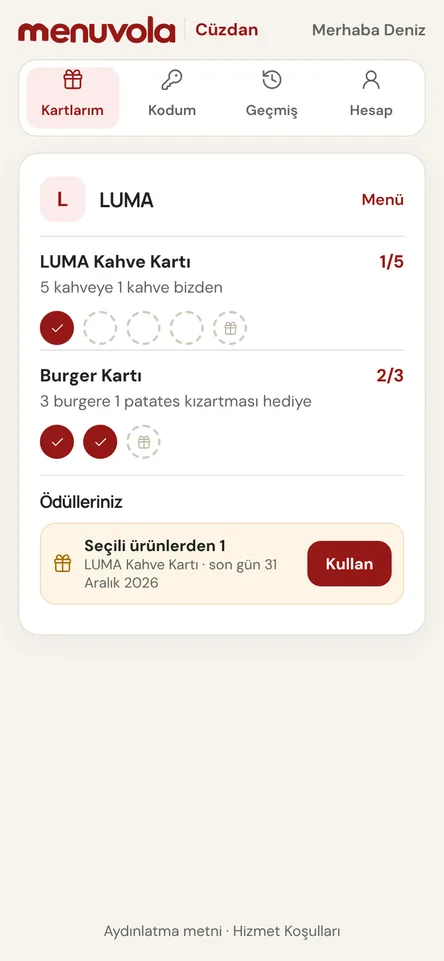
No lost cards, no forgotten stamps
Paper stamp cards get lost and stamps get forgotten. In Menuvola, the loyalty program is part of your QR menu: guests join with one tap on the “Loyalty program” card and follow their progress and rewards on their own phone. No cards to print, no stamp behind the counter.
The guest account is Menuvola Wallet, opened with a phone number and a one-time SMS code: no password, no app. The same wallet works at other businesses using Menuvola, each card kept separate. You never see a guest’s phone number or name, only your program’s numbers. The guest-facing Menuvola Wallet is currently available in Turkish.
Stamps are only given for completed purchases. With Menuvola Orders, staff link the guest’s wallet to the bill and stamps are added when it closes; cancelled, complimentary or unapproved items don’t count, and reopened bills are reversed. Without the ordering system, staff sign in to the stamp screen with their PIN and show a one-time QR code for the guest to scan.
Loyalty program in four steps
- 01Set up the programIn your dashboard, open Marketing → Loyalty program. Choose which dishes or categories earn stamps, how many earn a reward, the reward item, valid dates and a daily stamp limit.
- 02Guests join from the menuThe program appears as a card on your QR menu. Guests tap “Join”, open their Menuvola Wallet with the code sent to their phone, read the privacy notice and give explicit consent.
- 03Stamps when the bill closesGuests choose “Add to my wallet” when ordering, or give their wallet code to the server at payment. Stamps land when the bill closes; without the ordering system, staff show a stamp QR.
- 04Redeem with a codeWhen the card is full, the reward appears in the wallet. The guest shows a one-time code, staff enter it, and the item is added to the bill as a zero-priced line that reports as complimentary.
What you can do
All of it runs live on Menuvola today; which plan includes it is below.
- Stamp card“Buy 5 coffees, get 1 free”. The reward can be a fixed item or one staff pick from the same group.
- Buy one, get another“3 toasties earn a free orange juice”. Stamps build up across visits, and you can run up to ten programs at once.
- Rules against abuseStamps only on closed bills or staff one-time codes. A daily limit, ten-minute codes and a cap on wrong codes make misuse hard.
- Dates and validitySet start and end dates and how long rewards stay valid. Archived programs give no new stamps; earned rewards stay usable until they expire.
- Anonymous reportingMembers, stamps, rewards earned and redeemed, reward value at menu prices, and how many guests returned after their first reward.
- Respect for personal dataGuests give explicit consent; marketing permission is separate and optional. Guests can delete their account and data anytime, and businesses never see phone numbers.
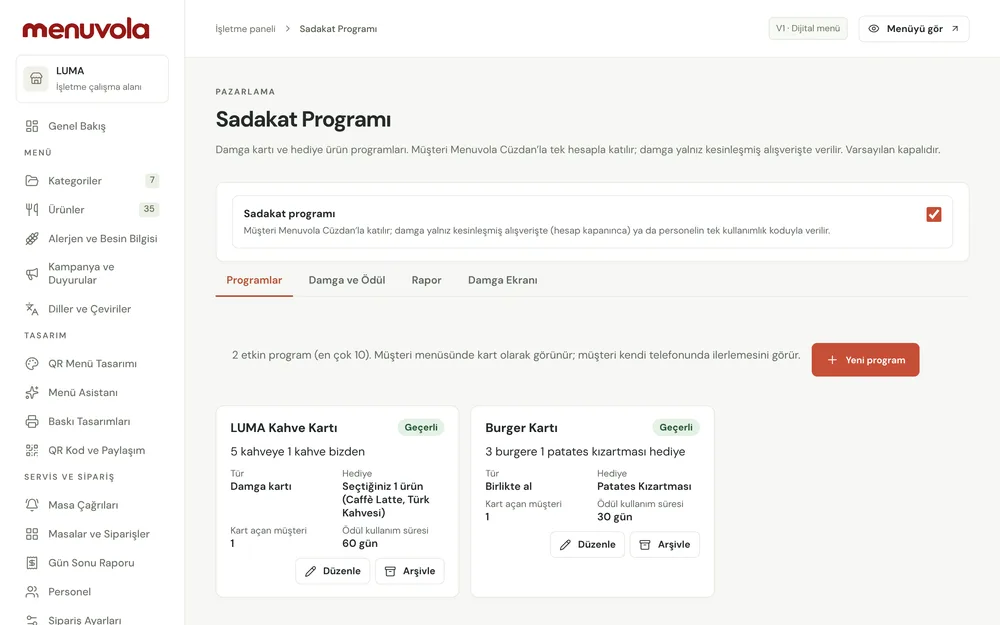
Screenshots show the Turkish interface; the business panel also works in English.
Loyalty program by plan
The loyalty program is available on every plan for food and drink businesses and is off by default. On Premium, Menuvola Orders adds stamps automatically when the bill closes; on Digital and Professional, staff show a one-time stamp QR from the stamp screen.
- DigitalIncluded
Stamp screen with one-time stamp QR codes.
- ProfessionalIncluded
Stamp screen with one-time stamp QR codes.
- PremiumIncluded
Automatic stamps when the bill closes, with rewards added to the bill as complimentary.
No automatic renewal, no commission on sales. See pricing
Questions you may have.
Do guests have to download an app?
No. Menuvola Wallet opens in the browser from the loyalty card on the QR menu or at menuvola.com/cuzdan. Guests sign in with a code sent to their phone, no password. It is currently available in Turkish.
When is a stamp given?
Only for completed purchases: with Menuvola Orders, when a bill linked to the guest’s wallet closes; otherwise via the one-time stamp QR shown by staff. Cancelled items earn nothing, and reopened bills are reversed.
Can the business see a guest’s phone number?
No. The business only sees anonymous numbers for its own program. When linking a wallet, the server sees just the last four digits of the number. A guest’s activity at other businesses is never shown to anyone.
How are rewards redeemed and reported?
The guest shows a one-time code valid for ten minutes. Staff enter it; with Menuvola Orders the item is added as a zero-priced line and reported as complimentary at end of day.
Can guests delete their account?
Yes, from the wallet’s Account tab with a code sent to their phone. Their number and name are removed, stamp counts stay anonymous, and unused rewards are cancelled.
Works well together
- Waiter callGuests call a waiter or ask for the bill from the QR code on the table; the request reaches your team with the table number and a sound alert.See details
- Menu analyticsSee which dishes guests look at and which ones sell, without collecting personal data, plus menu engineering and practical suggestions.See details
- QR menu designMosaic or Panorama layout with a live preview, plus printed menus, info sheets, QR price lists and numbered table cards from the same data.See details
Try it on your own menu.
Open an account and add your menu; no card needed, and nothing is charged when the trial ends. Questions? Message us on WhatsApp.