
Enter it once, right in every format.
Choose your QR menu’s look in the panel and watch it in a live preview. Printed menus, info sheets and table cards all come from the same information.
- Mosaic and Panorama layouts
- Three printed menu templates
- Your QR code never changes

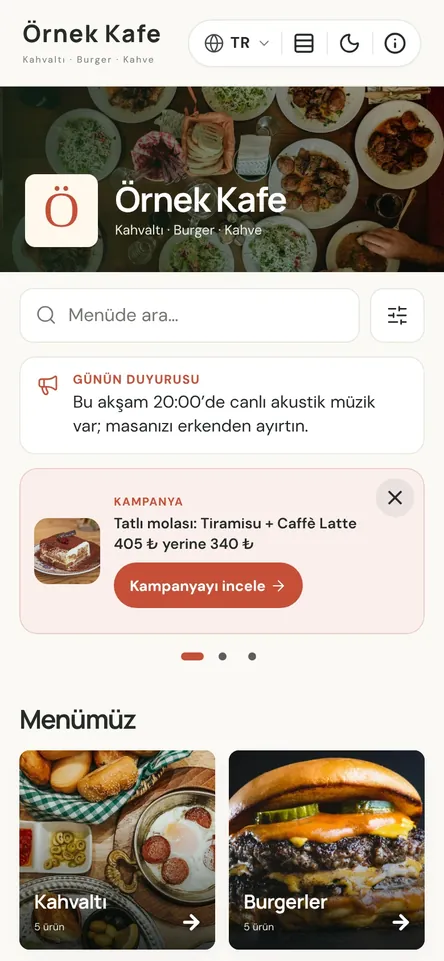
One source for every version of your menu
Update prices in bulk, run the menu in several languages, and keep 14 allergens and calories on every item. The printed menu, info sheet and QR table cards come from the same data, so when a price changes, every version follows.
You control the menu’s look and content from the panel, and see every change in a live preview before you save it. Enter items, prices, ingredients, allergens and calories once; Menuvola turns that into the QR menu, the printed menu, the info sheet and the table cards.
So the card on the table, the price list at the door and the menu on a guest’s phone never show different prices. Add or remove an item and the printed menu repaginates itself — the pages you see in the preview are the PDF you download.
QR menu design in four steps
- 01Pick a layoutOn the QR Menu Design page, choose Mosaic or Panorama, a default day or night theme, and what appears on the menu.
- 02See it liveToggle an option and see how your menu looks on a phone, right on the same screen. Save when you’re happy.
- 03Prepare your printsUnder Print Designs, set up QR table cards, the printed menu and the info sheet. The preview shows each page exactly as it will appear in the PDF.
- 04Change prices, not codesChange a price in the panel and the QR menu updates instantly; just download your prints again. The QR code on the table stays the same.
What you can do
All of it runs live on Menuvola today; which plan includes it is below.
- Two layouts: Mosaic and PanoramaLarge photo category cards, or strips that open one below the other. Ordering, filters and promotions work the same in both.
- Choose what the menu showsCover, search, item counts, descriptions, portions, calories and allergens. Required information always stays on the item page.
- Three printed menu templatesModern, Classic Bistro and Newspaper, in A4 or A3, with an optional cover page and thin frame. The menu splits into pages automatically, and you can also make a single-page wall menu.
- Numbered QR table cardsPrint-ready cards with table numbers; each code opens the menu with that table’s number. Add a Wi-Fi QR code to the back — it’s generated in your browser, and the password is never sent to our servers.
- Price list with a QR codeA printable A4 price list with a QR code, straight from your menu. Price changes are logged with the date and who made them.
- Share the menu as a linkAdd your menu link to your Instagram bio, Google Business Profile and WhatsApp messages. Shared links show a preview with your menu’s name and image, and the link stays the same when prices change.
- Choose the document languagePick the language for the printed menu, info sheet and table cards from your menu languages; the QR code then opens the menu in that language.
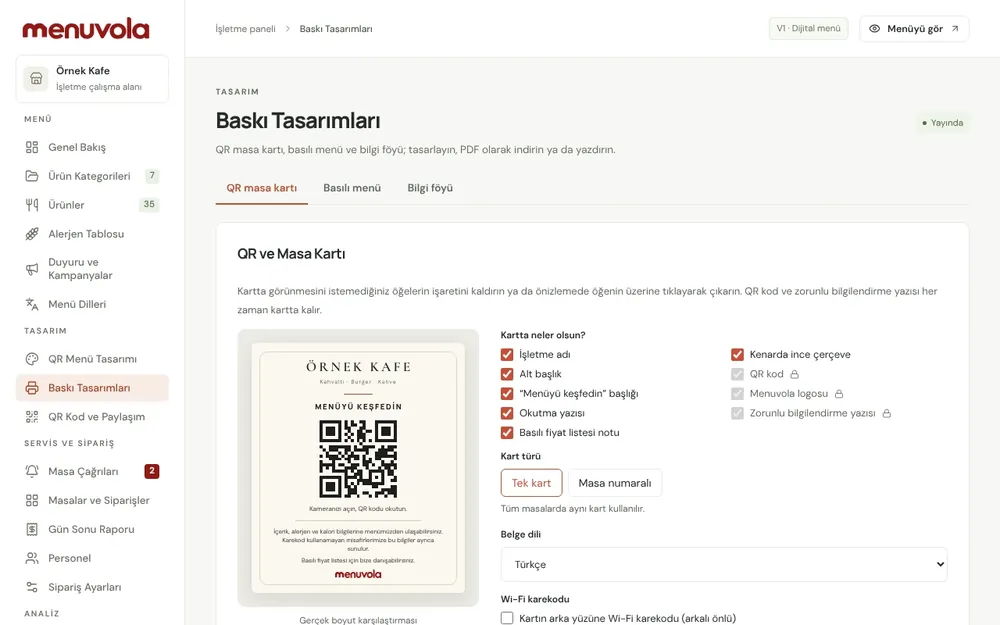
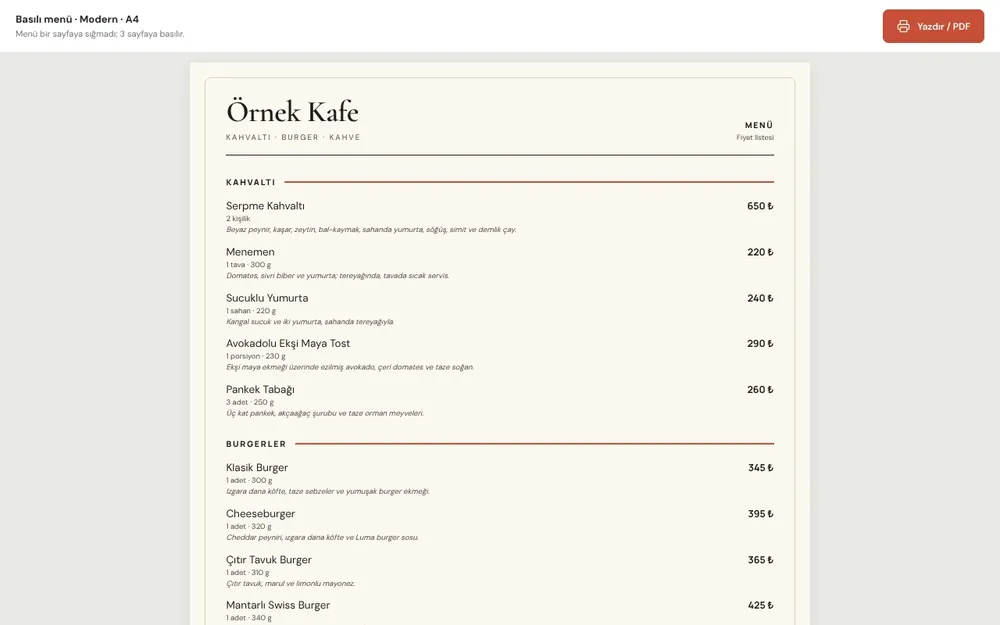
Screenshots show the Turkish interface; the business panel also works in English.
QR menu design by plan
The QR menu, printed menu, info sheet, allergen chart, table cards and every design tool are in all plans. On Professional and Premium, our team designs a QR card for your brand; printing and stands aren’t included.
- DigitalIncluded
Every design tool; you prepare the menu and prints yourself.
- ProfessionalIncluded
A branded QR card designed by our team.
- PremiumIncluded
A branded QR card designed by our team.
No automatic renewal, no commission on sales. See pricing
Questions you may have.
Do I need a new QR code when prices change?
No. Change prices in the panel and the menu updates immediately. The QR code on the table always stays the same.
Why would I still need a printed menu?
In some markets, Türkiye included, a menu can’t be offered by QR code alone and a printed price list must be available. Menuvola builds the printed menu and QR price list from the same data as your QR menu; when a price changes, download the new PDF and print it.
Is there a day and night mode?
Yes. You choose whether the menu opens in day or night mode by default; guests can switch on their own phone, and the choice is remembered for that menu.
Is printing table cards and stands included?
Print-ready files can be downloaded from the panel on every plan. Printing and stands aren’t included; we can quote based on quantity and model.
Works well together
- Multilingual menuChoose as many of 18 languages as your plan allows; guests read the menu in their own language, and your printed materials follow.See details
- Allergens and caloriesIngredients, 14 allergens and calories in one panel, with a guest allergen filter, a calorie calculator and a printable allergen chart.See details
- Menu analyticsSee which dishes guests look at and which ones sell, without collecting personal data, plus menu engineering and practical suggestions.See details
Try it on your own menu.
Open an account and add your menu; no card needed, and nothing is charged when the trial ends. Questions? Message us on WhatsApp.