
Your menu, in your guest’s own language.
Visitors read every dish, its ingredients and its allergens in their own language, while you track translation progress from one screen.
- Choose from 18 languages
- Opens in the phone’s language
- Official allergen names
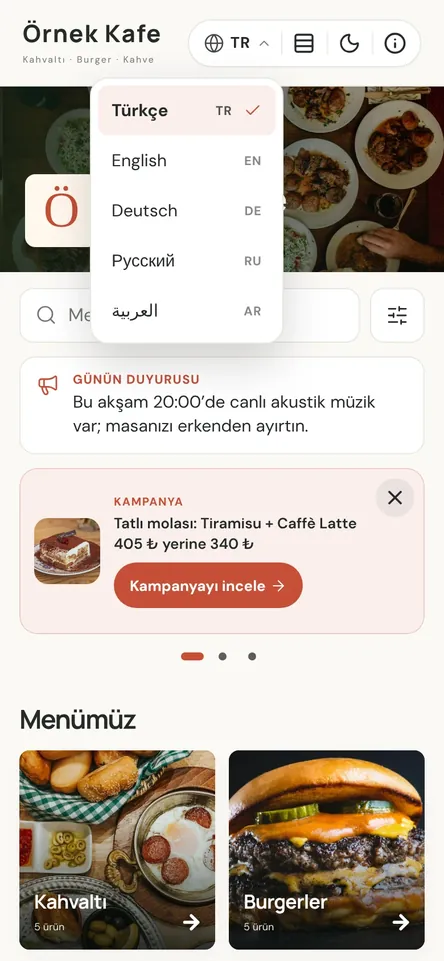
One menu, the same facts in every language
Pick from a pool of 18 languages. How many you can offer depends on your plan: 2 on Digital, 5 on Professional and 10 on Premium. Your menu’s main language is always on and counts toward that number; you decide which others to switch on.
If a guest’s phone is set to one of your menu languages, the menu opens in it, and guests can switch at any time. Names, descriptions, ingredients, categories and promotions appear in the chosen language, and the menu’s own buttons, such as cart, filters and call waiter, are ready in every language.
Allergens always appear under their official name in each language, so the allergen list stays correct even when you write the translations yourself. Arabic and Persian menus read right to left, while times and phone numbers stay intact and readable.
Multilingual menu in four steps
- 01Choose your languagesIn the dashboard, open Languages and translations and switch on as many as your plan allows. Your main language counts toward the total.
- 02Add translationsOn Digital, you enter them in the product window or by Excel. On Professional and Premium, our team translates and you review.
- 03Track what’s missingSee how many products and categories are translated per language, with missing fields listed for you to complete.
- 04Guests read in their languageThe same table QR code opens the menu in the phone’s language. Printed materials can use any of your menu languages.
What you can do
All of it runs live on Menuvola today; which plan includes it is below.
- Choose from 18 languagesEnglish, Turkish, German, Russian, Arabic, Persian, French, Polish, Ukrainian, Chinese, Spanish, Dutch, Italian, Romanian, Bulgarian, Korean, Japanese and Azerbaijani.
- Opens in the phone’s languageIf the phone’s language is on your menu, the menu opens in it; otherwise in your main language. Guests can switch any time.
- Correct allergen names everywhereAll 14 allergens use their official name in every language, and the allergen filter works in the chosen language too.
- Printed materials to matchPrint your menu, info sheet and QR table card in any menu language; the QR code opens the menu in that language.
- Translation status per languageSee how complete each language is, with untranslated products and categories listed language by language.
- Translations survive plan changesMove to a plan with fewer languages and the extras are hidden, not deleted. Upgrade and they come back as they were.
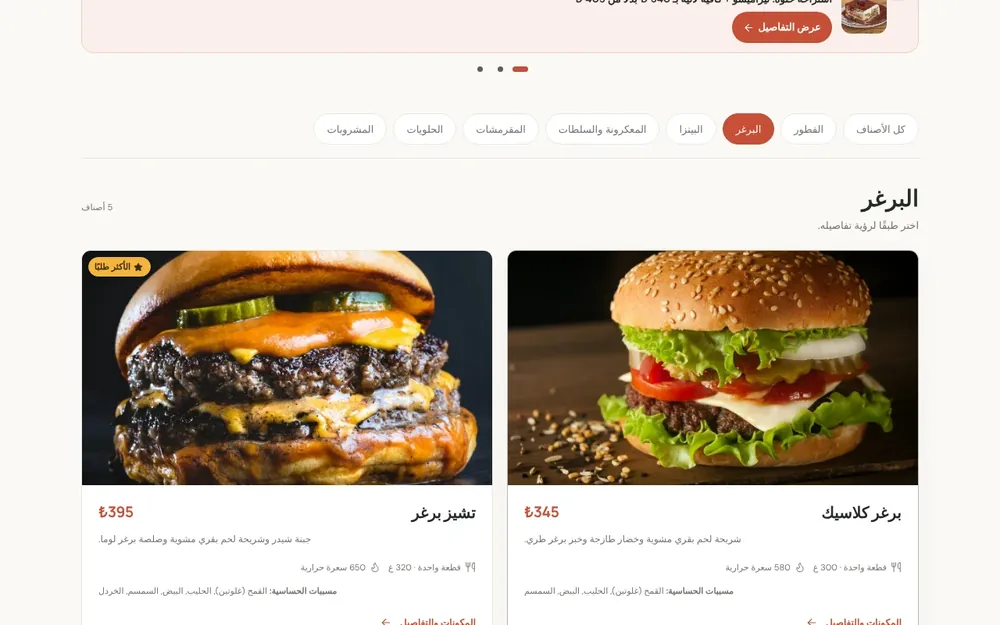
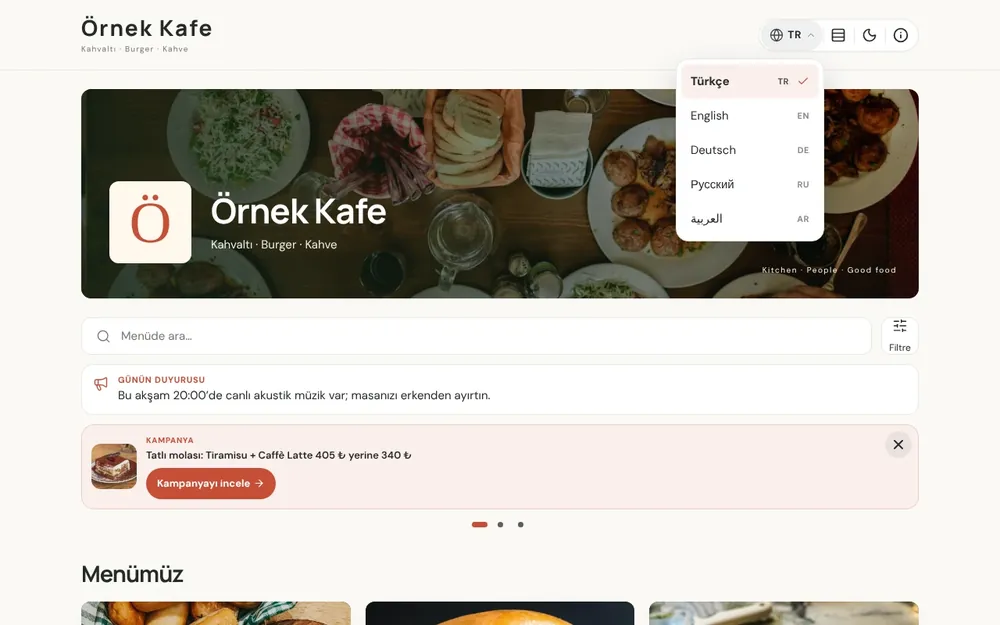
Screenshots show the Turkish interface; the business panel also works in English.
Multilingual menu by plan
Every plan includes a multilingual menu: 2 languages on Digital, 5 on Professional and 10 on Premium, chosen from 18. On Digital you enter translations yourself; on Professional and Premium our team does them.
- DigitalIncluded
2 languages; you enter the translations.
- ProfessionalIncluded
5 languages; translations by our team.
- PremiumIncluded
10 languages; translations by our team.
No automatic renewal, no commission on sales. See pricing
Questions you may have.
How many languages can my menu show?
2 on Digital, 5 on Professional and 10 on Premium, chosen from 18, with your main language always on and counted. Need more? We can quote for extra languages.
How does a guest choose a language?
If their phone is set to one of your menu languages, the menu opens in it automatically, and they can switch from the menu. No app, no sign-up.
Who does the translation?
You on Digital; our team on Professional and Premium, sent for your approval. Prices and allergens are entered once and look the same in every language.
What if a product isn’t translated yet?
Untranslated fields show in your main language, so nothing disappears from the menu. The Languages and translations page shows what’s missing where.
Does the Arabic menu display properly?
Yes. Arabic and Persian read right to left with mirrored arrows, while time ranges and phone numbers stay left to right. Printed materials follow the same direction.
Works well together
- Allergens and caloriesIngredients, 14 allergens and calories in one panel, with a guest allergen filter, a calorie calculator and a printable allergen chart.See details
- QR menu designMosaic or Panorama layout with a live preview, plus printed menus, info sheets, QR price lists and numbered table cards from the same data.See details
- Menuvola AIUpload a photo, PDF or link to your menu; AI reads the products, suggests what’s missing, and you approve.See details
Try it on your own menu.
Open an account and add your menu; no card needed, and nothing is charged when the trial ends. Questions? Message us on WhatsApp.