
Who’s on shift, who has which table, on one screen.
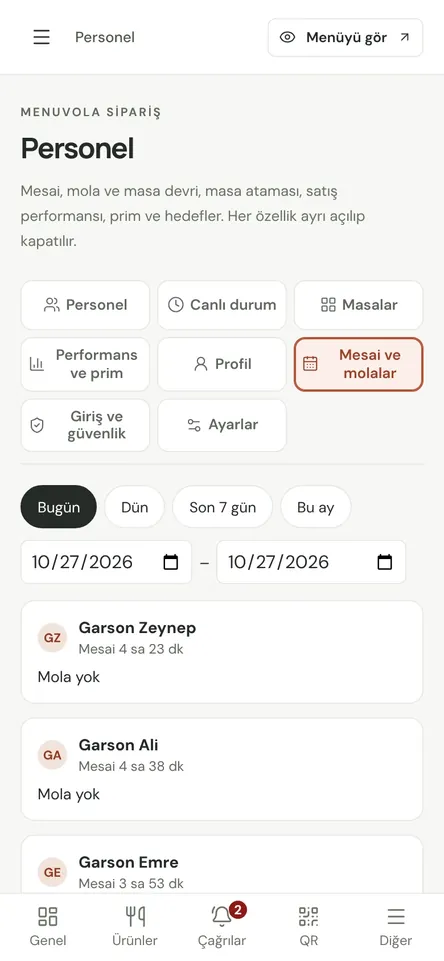
Each team member signs in with their own PIN. Shifts, breaks, table responsibility and sales performance are all recorded in one place.
- PIN sign-in, role-based screens
- Shifts, breaks and table handover
- Performance and commission reports

Don’t let service depend on who remembers what
Staff management is part of Menuvola Orders, and you switch it on when you need it. Servers see tables, the kitchen sees only the kitchen display, cashiers see open bills. Everyone signs in with a personal PIN, on a shared tablet or their own phone.
With shift tracking on, staff tap “Start shift” to begin and pick a colleague to cover their tables before a break. Table responsibility, handovers and sales are recorded per person, so the end-of-day report shows who looked after which tables and what they sold.
New QR orders, waiter calls, bill requests and ready dishes go to the table’s responsible server first; if they’re on break or off shift, every server gets it. Cashiers and managers see all tables. No two people run to the same call, and no table is left without an owner.
Staff management in four steps
- 01Add your teamOn the Staff page of your dashboard, add people and their roles and give each a PIN. One person can hold several roles.
- 02Choose the modulesTurn on shifts and breaks, table assignment, performance, commission and targets as you need them. Anything switched off stays hidden on the terminal.
- 03Start serviceStaff sign in with their PIN and start their shift. If you use service zones, they pick today’s zone. Alerts go to whoever owns the table.
- 04Review the reportsPick a period and check live status, shifts and breaks, table performance, performance and commission, and staff profiles.
What you can do
All of it runs live on Menuvola today; which plan includes it is below.
- PIN sign-in and role screensEveryone sees only their role’s screen. Repeated wrong PINs briefly lock the person and device; unlock them from the dashboard.
- Shifts and breaks“Start shift” and “End shift” record working hours. A shift left open ends automatically after the time you set (at most 11 hours), with a warning to the person 30 minutes before.
- Table assignment and handoverAn unassigned table goes to whoever enters its first order. A table with guests can’t just be dropped: it’s handed over to a colleague and moves once they accept.
- Service zonesSplit the floor into zones like garden or terrace. Servers see only their zone’s tables and alerts; managers set the weekly plan and approve changes.
- Performance and commissionInformational commission from net sales, pairing sales and category rates, plus personal targets. No wages or payroll. Table reports show revenue, guests and average bill.
- Each person’s own screenAs far as you allow, staff see their own sales, tables and profile on the terminal’s “Me” screen. They never see anyone else’s data.
- Alerts to the right personWith the staff app on their home screen, servers get order, call, bill and ready alerts, sent only to whoever is on shift and owns the table.
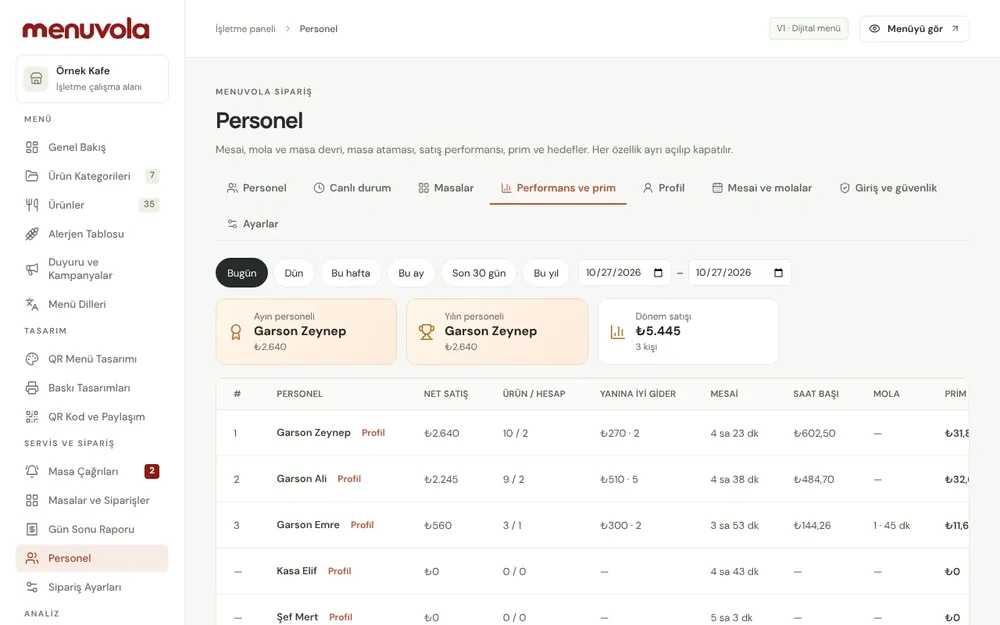
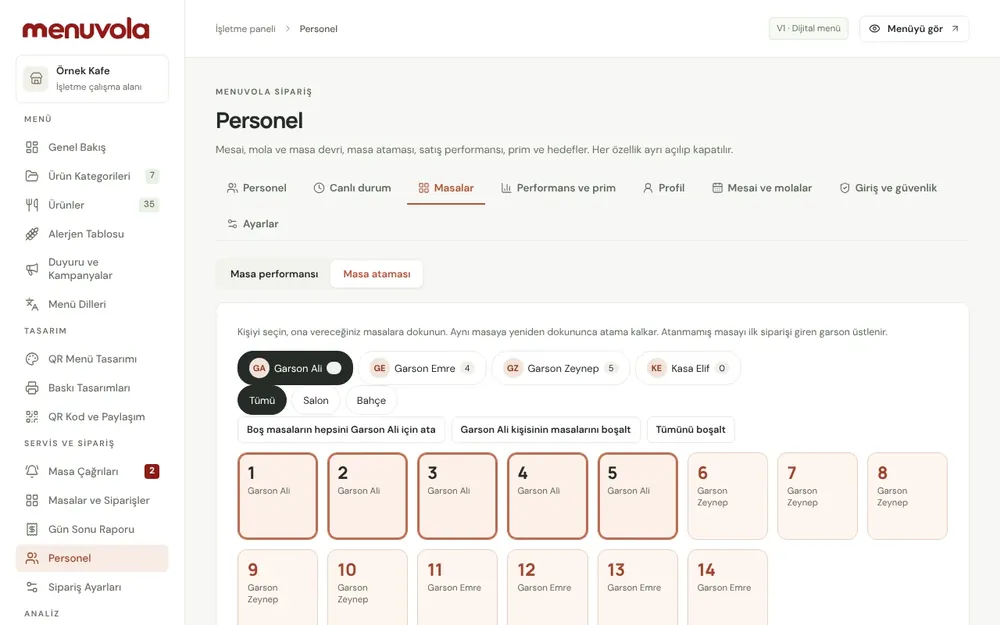
Screenshots show the Turkish interface; the business panel also works in English.
Staff management by plan
Staff management is part of Menuvola Orders, which is included in Premium at no extra cost. The staff module is off by default, and you turn on only the parts you need.
- DigitalNot in this plan
- ProfessionalNot in this plan
- PremiumIncluded
Menuvola Orders and the staff app included, with no per-table or per-device fees.
No automatic renewal, no commission on sales. See pricing
Questions you may have.
Does every server need their own phone?
No. On a shared tablet or phone, each person signs in with their own PIN. You can also pair a personal phone as a device tied to that one person.
Does the commission feed into payroll?
No. Commission and targets are informational; Menuvola does not calculate wages, payroll or payments. Commission uses your current rates, so changing a rate also changes past periods.
What happens to a server’s tables during a break?
Before going on break, the server picks a colleague to cover their tables. The break starts once the colleague accepts, and table alerts go to them. On return, tables are handed back with a confirmation.
Can staff see each other’s sales?
No. Staff see only their own data. You decide which sections (sales, ranking, profile) are visible, for everyone or per person.
What if someone forgets to end their shift?
It ends automatically after the time you set (at most 11 hours), with a warning 30 minutes before. Your dashboard also lists long-open shifts.
Works well together
- Kitchen displayOrders from waiters and from the table land on kitchen and bar screens; when they’re ready, the waiter is notified.See details
- Waiter callGuests call a waiter or ask for the bill from the QR code on the table; the request reaches your team with the table number and a sound alert.See details
- Menu analyticsSee which dishes guests look at and which ones sell, without collecting personal data, plus menu engineering and practical suggestions.See details
See it in a live demo.
Message us on WhatsApp; we’ll show you Menuvola live at a time that suits you and help you pick the right plan.