
Run your menu from Claude, ChatGPT or Gemini.
Connect Menuvola to the AI assistant you already use and update prices, sold-out items and descriptions just by chatting. Nothing changes until you approve it.
- Uses your own subscription
- Preview first, then approve
- Undo from the dashboard

One sentence, no dashboard, menu updated
An item runs out mid-service, or a supplier raises a price. Instead of opening the dashboard, type to your AI assistant: “Raise the lentil soup by 10”, “The dumplings are sold out today”, “Add 5% to all desserts”. Menuvola connects to Claude, ChatGPT and Gemini through MCP, an open standard, so the assistant can read your menu and prepare the change.
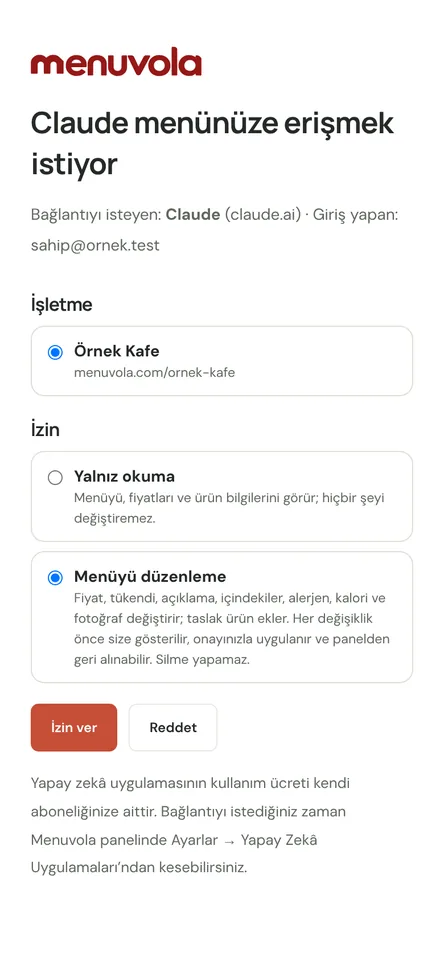
Every change takes two steps. The assistant first shows old and new values side by side, and nothing is written until you approve. Approval is single-use and valid for 10 minutes; if the product was edited meanwhile, the old preview no longer applies. Nothing can be deleted, and new products arrive as drafts.
Your dashboard rules still apply: a live product can’t lose its ingredients or allergens, and product and photo limits stay the same. Every change is logged under the app’s name and can be undone in one tap. AI usage is covered by your own subscription; Menuvola charges nothing extra for the connection.
Claude, ChatGPT and Gemini in four steps
- 01Turn it onIn the dashboard, open Settings → AI apps and copy the server address. Setup steps for each app are on the same page.
- 02Add it to your appAdd the address as a custom connector in Claude, ChatGPT or Gemini, then sign in on the Menuvola screen with your dashboard login and grant access.
- 03Ask and previewType what you want. The assistant finds the product and previews old and new values; if it picked the wrong item, correct it.
- 04ApproveThe change goes live on your QR menu and appears in the activity log under the app’s name, ready to undo.
What you can do
All of it runs live on Menuvola today; which plan includes it is below.
- Price updatesChange one price or a whole category by percentage. The preview lists every product’s old and new price.
- Sold out and back on saleSay an item is sold out and the menu shows it as Sold out. When stock is back, say it’s available again.
- Fix product detailsCorrect descriptions, ingredients, allergens, portions and calories by chat. A live product’s ingredients and allergens can’t be emptied.
- New products and photosNew products arrive as hidden drafts until you publish them. For a new photo, you get a single-use upload link.
- Menu and sales questionsSearch products and get summaries from your views and sales report: “Which dessert got the most views this week?”
- Preview first, then approveEvery write starts as a preview; approval is single-use and valid for 10 minutes, and stale previews aren’t applied.
- Undo from the dashboardSee recent changes on the AI apps page and undo any of them in one tap; added products are archived.
- No deleting, one businessNothing can be deleted through the connection. Access covers only the business you choose, and you can switch it off any time.
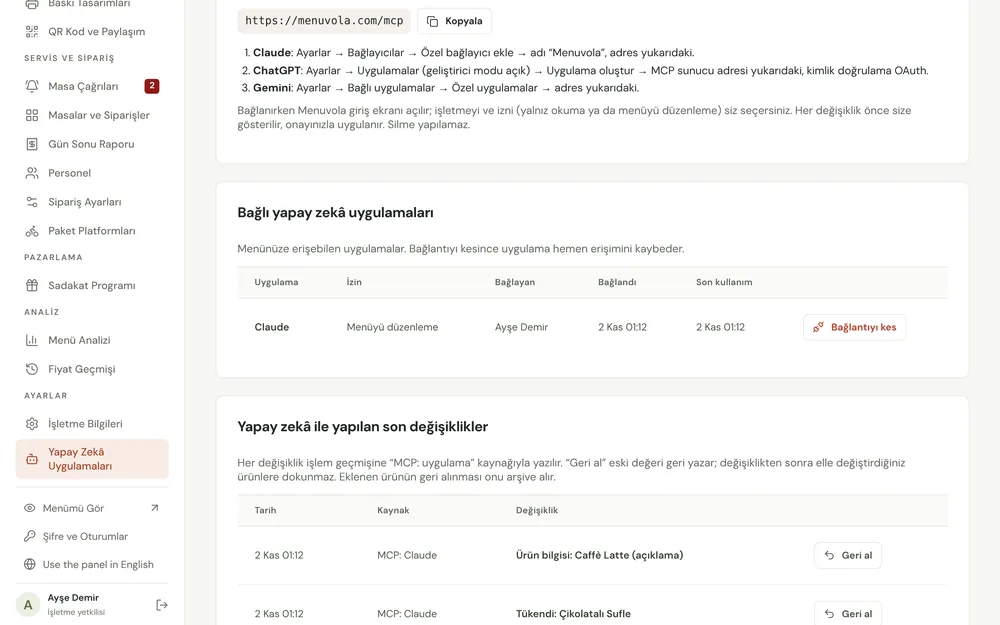
Screenshots show the Turkish interface; the business panel also works in English.
Claude, ChatGPT and Gemini by plan
Menu management from Claude, ChatGPT and Gemini is included in the Professional and Premium plans. AI usage is covered by your own subscription; Menuvola charges nothing extra.
- DigitalNot in this plan
- ProfessionalIncluded
We handle setup; you make daily price and sold-out updates by chat.
- PremiumIncluded
No product limit, so category-wide price updates save the most time.
No automatic renewal, no commission on sales. See pricing
Questions you may have.
Will the AI change my menu on its own?
No. Every change first arrives as a preview, and nothing is written until you approve. Approval is single-use and valid for 10 minutes. Nothing can be deleted, and every change can be undone from the dashboard.
Which apps does it work with?
Claude, ChatGPT and Gemini, each via a custom connector using Menuvola’s server address. Connector availability depends on your subscription and the app’s settings; setup steps are in your dashboard.
Does it cost extra?
Not from Menuvola: the connection is included in Professional and Premium. Usage of the AI app itself is covered by your own Claude, ChatGPT or Gemini subscription.
Is it secure?
You sign in on Menuvola’s own screen and grant access to one business only; your password never goes to the AI app. You can switch the connection off any time. If your plan changes, it closes and your records are kept.
Works well together
- Menuvola AIUpload a photo, PDF or link to your menu; AI reads the products, suggests what’s missing, and you approve.See details
- Menu analyticsSee which dishes guests look at and which ones sell, without collecting personal data, plus menu engineering and practical suggestions.See details
- QR menu designMosaic or Panorama layout with a live preview, plus printed menus, info sheets, QR price lists and numbered table cards from the same data.See details

See it in a live demo.
Message us on WhatsApp; we’ll show you Menuvola live at a time that suits you and help you pick the right plan.