
Allergens and calories, complete in one place.
Guests filter the menu by the allergens they avoid. You calculate calories from recipe ingredients and see what’s missing before anything goes live.
- Allergen filter for guests
- Calories from recipe ingredients
- Printable allergen chart

What the rules require, what guests ask
Menu labelling rules are tightening. In Türkiye, ingredients become mandatory at the end of 2026 and calories follow a year later for single-site venues, while allergen information is already required. Menuvola keeps any item without ingredients or allergens off the live menu; if calories are missing, the panel flags it instead of blocking it.
Ingredients are a required field on every item. As you type them, the panel suggests likely allergens — “butter” points to milk, for example — and you decide what to tick. Calories are calculated from the ingredients and quantities in the recipe, then saved to the item per portion in kcal and kJ.
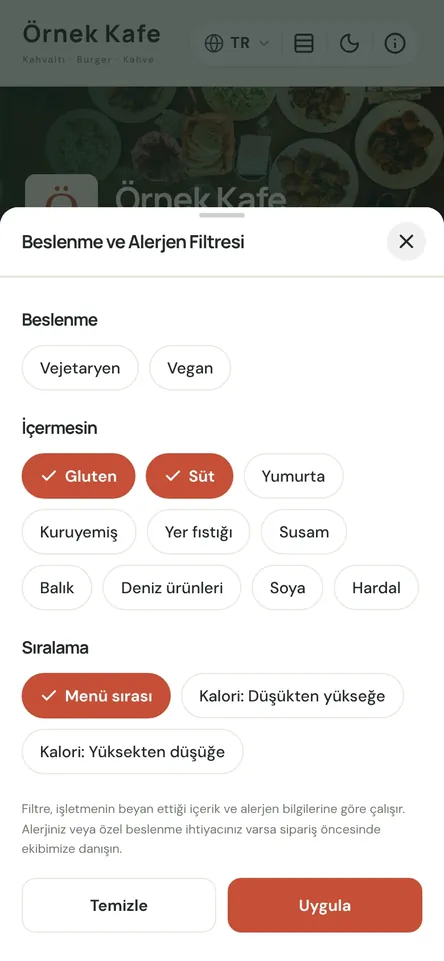
Guests see the same information on each item page, and it powers the menu filter: someone choosing gluten-free, dairy-free or vegan sees only the dishes that fit. The filter relies on the allergen data the venue enters, so its accuracy stays in your hands.
Allergens and calories in four steps
- 01Enter ingredientsAdd the ingredients in the item window. The panel suggests possible allergens from what you type; you choose which of the 14 allergens apply.
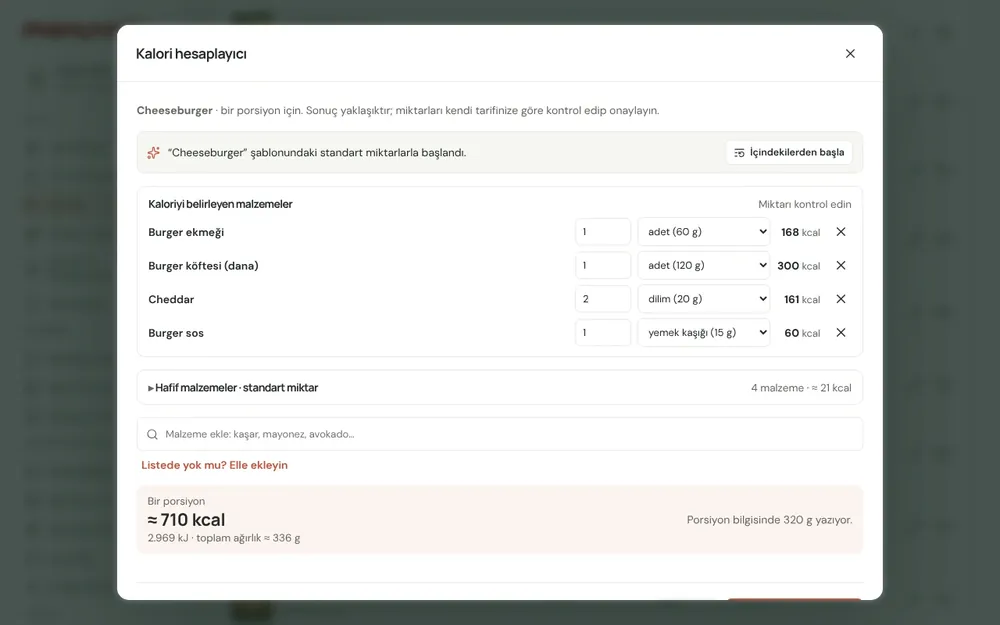
- 02Calculate caloriesPick the recipe’s ingredients and amounts in the calorie calculator. Energy per portion comes from the built-in ingredient database; you check it and save.
- 03Spot the gapsA menu readiness score and a list of gaps show what each item is missing. Items without ingredients or allergens stay in draft; items missing calories go live with a warning.
- 04Serve it to guestsItem details and the allergen filter in the QR menu, a printable allergen chart, and an info sheet for guests who can’t scan a code — all from the same data.
What you can do
All of it runs live on Menuvola today; which plan includes it is below.
- Allergen filter for guestsGuests choose the allergens they want to avoid and the menu shows only suitable items. Vegan and vegetarian tags are in the filter too, and appear as coloured badges on item cards.
- Allergen suggestions from ingredientsThe panel reads the ingredient list and suggests likely allergens: milk in butter, gluten in flour. It’s rule-based, not AI, and accepting a suggestion is always your call.
- Calorie calculatorkcal and kJ per portion from an ingredient database and ready-made templates. No AI involved; the calculation lines are stored with the item and never sent to the guest menu.
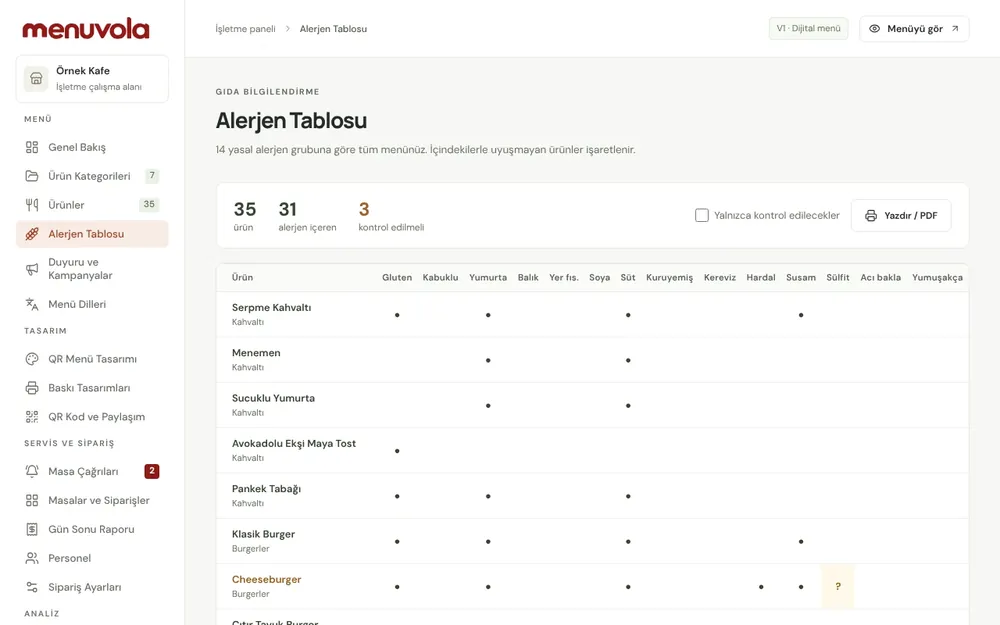
- Printable allergen chartYour whole menu’s allergens on one landscape A4 page: items in rows, the 14 allergens in columns. Pin it up in the kitchen or at the till, or hand it to a guest who asks.
- Info sheetA printed version of ingredients, allergens and energy for guests who can’t scan the QR code. It won’t print until every live item has ingredients and allergens; items missing calories are marked.
- Menu readiness scoreA card on the Overview shows, as a percentage, how much of your required menu information is complete, and lists the items still missing something.
Screenshots show the Turkish interface; the business panel also works in English.
Allergens and calories by plan
Ingredients, 14 allergens, the allergen filter, calorie calculator, allergen chart and info sheet are in every plan. On Professional and Premium, our team enters this information and you approve it.
- DigitalIncluded
You enter the information; every tool is included.
- ProfessionalIncluded
Our team adds ingredients, allergens and calories; you approve.
- PremiumIncluded
Our team adds the data, and staff can look up allergens on the ordering terminal.
No automatic renewal, no commission on sales. See pricing
Questions you may have.
Does an item without calories still appear on the menu?
Yes. Only missing ingredients or allergens block publishing. An item without calories goes live, the panel flags it in the item list and on the Overview, and the info sheet marks the energy line as empty. Guests only see a calorie line once a value is entered.
Does the calorie calculator use AI?
No. It calculates from a built-in ingredient database using the quantities you enter. You can see line by line how much energy each ingredient adds, and you check the result before saving it.
Will the allergen filter always exclude the right dishes?
The filter works from the allergen information the venue enters, so ingredients and allergen selections need to be accurate and current. When a recipe or supplier changes, update the item too. The venue remains responsible for the accuracy of its information.
What about guests who don’t want to scan a QR code?
Print the allergen chart for the whole menu, or the info sheet with ingredients, allergens and energy for each item. Both come from the same data as the QR menu, so they never disagree.
Works well together
- Menuvola AIUpload a photo, PDF or link to your menu; AI reads the products, suggests what’s missing, and you approve.See details
- QR menu designMosaic or Panorama layout with a live preview, plus printed menus, info sheets, QR price lists and numbered table cards from the same data.See details
- Multilingual menuChoose as many of 18 languages as your plan allows; guests read the menu in their own language, and your printed materials follow.See details

Try it on your own menu.
Open an account and add your menu; no card needed, and nothing is charged when the trial ends. Questions? Message us on WhatsApp.