
Which dishes get attention, and which ones sell?
Count what guests look at on your menu without storing personal data, then put it next to sales and costs to make menu decisions with real numbers.
- Views and sales side by side
- Menu engineering in four groups
- Suggestions based on your menu

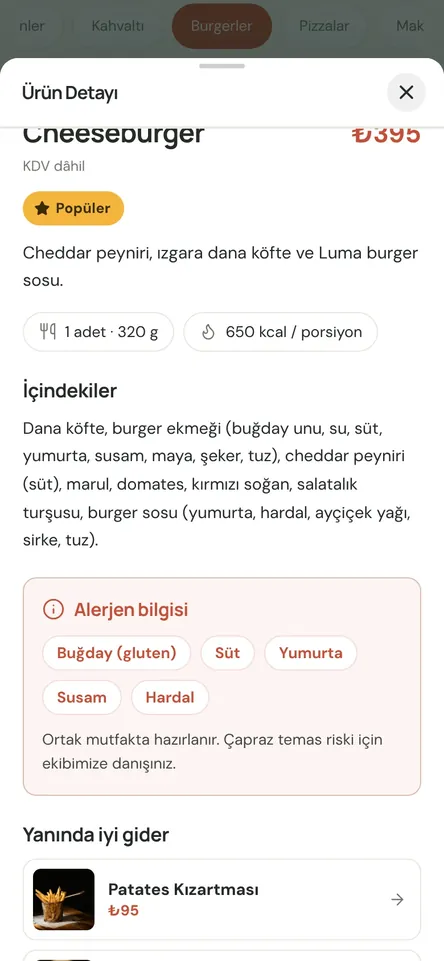
Your menu tells you what sells and what gets skipped
Menuvola counts how often guests open each dish on your menu, without recording who they are. If you use Menuvola Orders, those views sit right next to your sales. Add product costs by hand and you also see which dishes actually leave a margin.
A dish with many views but few orders is usually being turned down for its price, photo or description. A dish nobody opens is getting lost. Menu analytics lists both. Add a photo, move it to another category, link it as a pairing or put it in a campaign, then compare next period.
Menu analytics in four steps
- 01Keep your menu liveEvery time a guest opens a dish, the counter goes up. Their identity, phone number and location are never recorded.
- 02Let sales flow inWith Menuvola Orders, only items on closed bills count as sold. Open, cancelled or unapproved orders are left out.
- 03Enter your costsType product costs quickly from your phone, or on Premium let them be calculated from recipes. Only you can see costs.
- 04Review the suggestionsThe Menu analytics page has tabs for suggestions, views and sales, menu engineering and menu health. Act on what applies to you.
What you can do
All of it runs live on Menuvola today; which plan includes it is below.
- Views and salesSee how many times each dish was opened and how many were sold, and spot the ones that get looked at but rarely ordered.
- Menu engineeringDishes are sorted by popularity and margin into four groups: stars, plowhorses, puzzles and dogs.
- Food cost and marginEnter costs quickly from your phone. Dishes whose cost exceeds 35% of the price are flagged. Only you can see costs.
- Suggestions for your menuA popular dish with no photo, a category with no lighter option, a dish that never sells: suggestions that change with your menu.
- Taps on your menuMenu opens, dish views and taps on buttons like Google review, Wi-Fi, location, phone and social media, counted for the last 30 days.
- No personal dataCounts are per dish and per button. A guest’s identity, phone number or location is never stored. The insights are rule-based and do not use AI.
- Review once a monthOnce a month, add photos where they’re missing, rethink dishes that get viewed but not ordered, and drop or promote ones that never sell. Next month, see the effect.
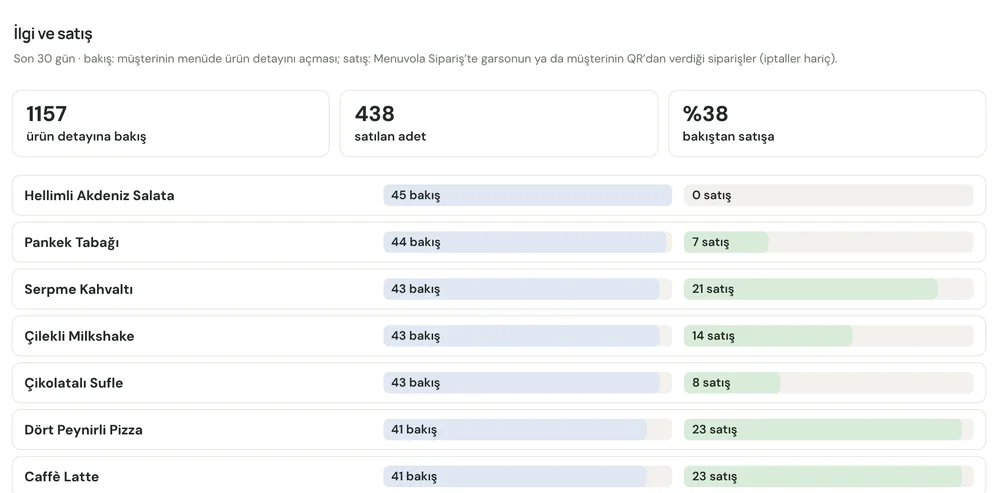
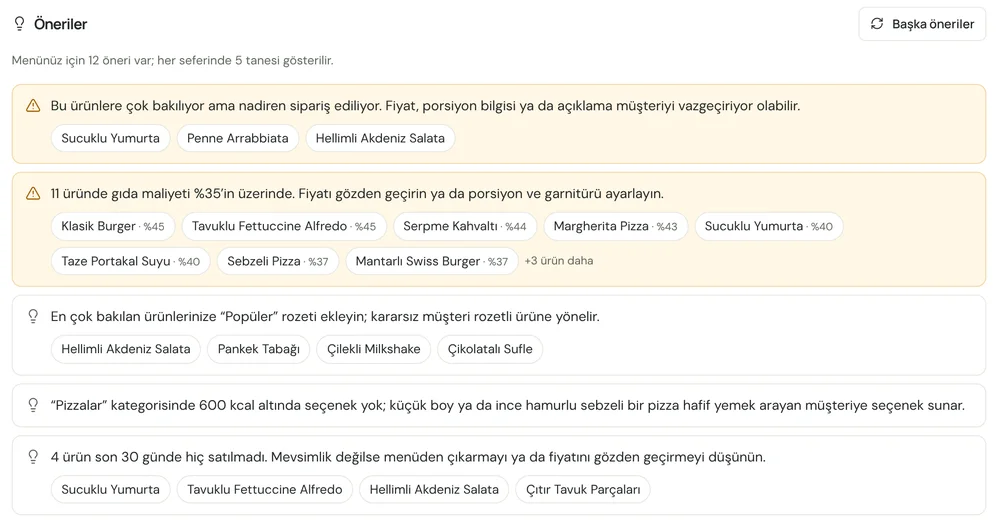
Screenshots show the Turkish interface; the business panel also works in English.
Menu analytics by plan
Dish views and menu suggestions are included in every plan. Sales data comes with Menuvola Orders on Premium, and recipe-based costs come from the stock, recipe and costing module on Premium.
- DigitalIncluded
View counts, suggestions, and margins from costs you enter.
- ProfessionalIncluded
View counts, suggestions, and margins from costs you enter.
- PremiumIncluded
Views plus sales plus recipe costs, so menu engineering runs on full data.
No automatic renewal, no commission on sales. See pricing
Questions you may have.
Does menu analytics collect guests’ personal data?
No. Counting is per dish: how many times its details were opened. A guest’s name, phone number, location or device ID is never stored.
Is it useful without sales data?
Yes. View counts and suggestions work on every plan, showing your most viewed dishes, popular ones without a photo and the ones nobody opens. With Menuvola Orders, sales are added alongside.
How is menu engineering calculated?
Dishes are placed into four groups by popularity and margin: stars (popular and profitable), plowhorses (popular, lower margin), puzzles (profitable but rarely chosen) and dogs. Margins require product costs.
Which period can I look at?
You pick a start and end date for views and sales; menu taps cover the last 30 days. Only closed bills count as sales, so cancelled or open bills don’t skew results.
Who can see cost information?
Only authorized users of your business dashboard. Costs are never sent to the guest menu or the staff terminal.
Works well together
- Stock and recipesProduct costs from ingredients and recipes, stock deducted on closed bills, purchases, waste, stock counts and profitability reports.See details
- QR menu designMosaic or Panorama layout with a live preview, plus printed menus, info sheets, QR price lists and numbered table cards from the same data.See details
- Staff managementPIN sign-in, shifts and breaks, table assignment and handover, service zones, performance and informational commission.See details
Try it on your own menu.
Open an account and add your menu; no card needed, and nothing is charged when the trial ends. Questions? Message us on WhatsApp.