
How does QR table ordering work? A guide for restaurants
Contents 13 sections
What is QR table ordering?
QR table ordering means the guest scans the code on the table and sends the order from their own phone. The difference from a QR menu is simple: a QR menu only shows the menu, and the order is still given to the waiter by voice. With QR ordering, the menu becomes an ordering screen and the order goes straight into the venue's system.
| QR menu | QR table ordering | Classic order with a waiter | |
|---|---|---|---|
| Where does the guest see the menu? | On their own phone | On their own phone | On a printed menu or a phone |
| Who enters the order? | The waiter | The guest; the waiter confirms | The waiter |
| How the order reaches the kitchen | Waiter's ticket or by voice | Kitchen display after confirmation | Ticket, printout or by voice |
| Extra orders (a second coffee, a dessert) | Guest has to call the waiter | Guest sends it whenever they like | Guest has to call the waiter |
| Infrastructure needed | A digital menu | A digital menu + staff screens | An order-taking routine |
If you do not have a digital menu yet, start there; ordering is added on top of that menu. Our comparison of QR menus and PDF menus explains what a good one needs.
Step by step: what happens when a guest scans the code?
Details vary between systems, but a well set-up table ordering flow has six steps. The first three happen on the guest's phone, the last three on the staff screens.
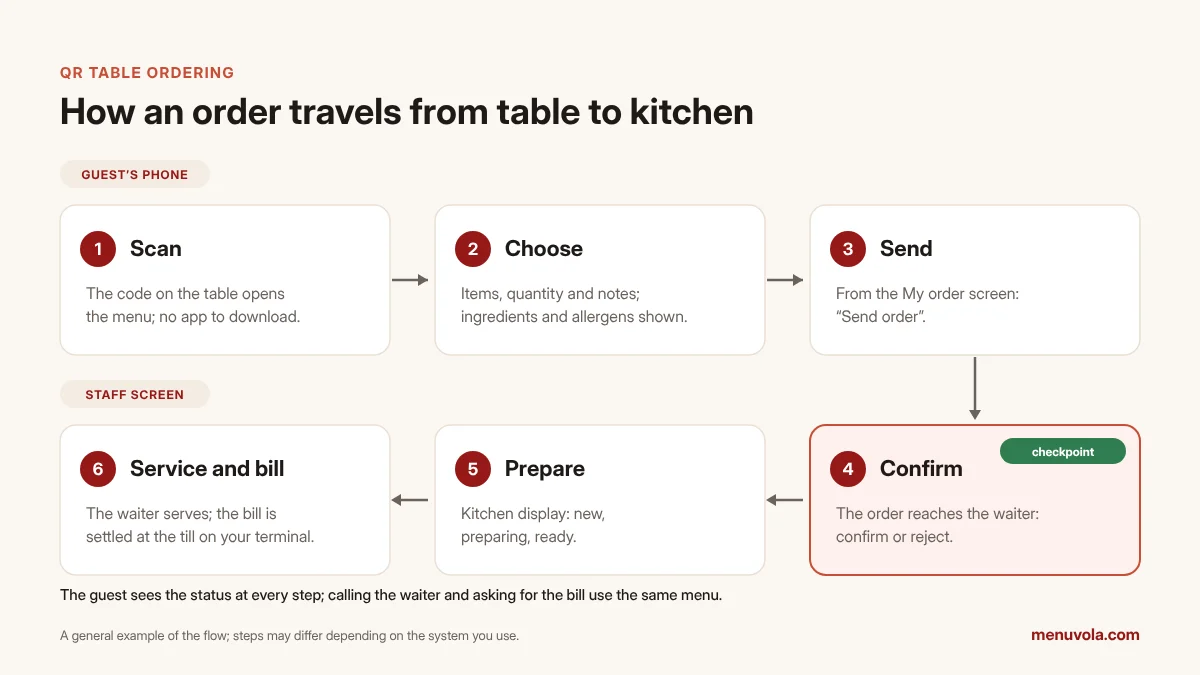
- Scan: The guest scans the code on the table with the phone camera. The menu opens in the browser; no app, account or phone number is needed. With a table-specific code, the table number is part of the link.
- Choose: The guest picks items, quantities and any notes ("no onions", "medium rare"). Each item's details show ingredients, allergens and portion information; a guest from abroad can read the menu in their own language.
- Send: The guest checks the basket and sends the order. From this point the order status appears on the guest's screen.
- Waiter confirms: The order arrives on the waiter's screen as a request. The waiter looks at the table; if the order is genuine, they confirm it, otherwise they reject it. This step is the strongest protection against wrong-table and prank orders.
- Kitchen prepares: The confirmed order moves to the kitchen or bar display, with notes and allergens on top of the order. The kitchen marks it "preparing" and "ready".
- Service and bill: Ready items show up for the waiter and are served. If the guest wants, they can order more from the same menu, call the waiter or ask for the bill. The bill is settled at the till.
Why does waiter confirmation matter?
In some systems the guest's order goes straight to the kitchen. On paper this is faster, but in practice it creates three risks:
- Wrong table: The guest has changed tables or scanned another table's card. The food goes to the wrong table and the bill gets mixed up.
- Prank or mistaken orders: Someone who is not sitting at the table, or a guest who taps twice by accident, creates unnecessary work for the kitchen.
- Closed table: An order arrives for a table that has not been opened yet or whose bill is already closed.
Waiter confirmation removes these risks with a check of a few seconds. To keep it from slowing service down, pay attention to two things: the request must be clearly visible on the waiter's screen (with sound, vibration or a notification), and unconfirmed requests should expire automatically after a set time. Accepting only one pending order from the same phone at a time, and blocking a phone from sending orders to a different table on the same day, also goes a long way to prevent misuse.
A QR code per table or one QR code for all?
When preparing table cards, you have two options: give each table its own code, or use the same code on every table and ask the guest for the table number.
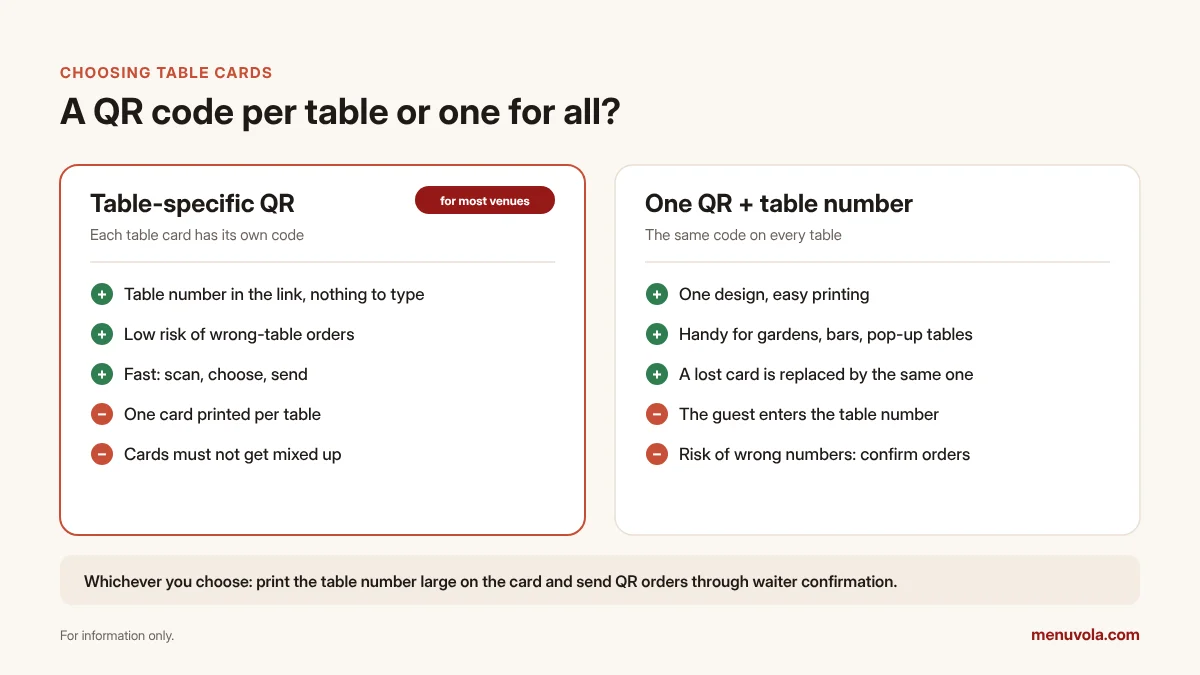
If the tables in your dining room are fixed, a table-specific code usually works better: the guest types nothing and the order lands on the right table. In a garden, at the bar or at events, where tables move often, one shared code can be practical; in that case the table number must be written large and clearly on the card and on the table, and waiter confirmation must always be on.
A few practical notes on card design:
- Add a short instruction next to the code, for example "Scan to see the menu and order".
- Print the table number on the card as well, so guest and waiter talk about the same number.
- Test the card in low light and with different phones; reflective lamination can make scanning harder.
- If the code also gives ingredient information, state on the card that the information is available another way for guests who cannot use the code.
What are the benefits for the venue?
The benefits depend on how the venue works; the ones below are the most common. To measure the effect in your own venue, look at the same indicators for a few weeks before and after setup (for example: average bill per table, time between ordering and service, and how many tables can be covered at peak times).
- Less waiting: The guest can send the order as soon as they decide; they do not wait for the waiter to come over.
- Easier extra orders: No need to catch the waiter for a second drink or a dessert. "Goes well with" suggestions on the item page also help with upselling.
- Fewer misunderstandings: The order arrives in writing; notes and allergens sit on top of the order on the kitchen display. In a noisy room, "write what you think you heard" mistakes drop.
- Waiters' time goes to the valuable work: Instead of writing orders down, they spend time on service, recommendations and guests.
- Visitors feel at ease: A tourist who reads the menu in their own language knows exactly what they are ordering.
Where do you need to be careful?
QR table ordering on its own is not enough for every guest and every venue. Know these limits before you start:
- Not every guest wants to order by phone. There will always be older guests, guests with a flat battery or guests who prefer to talk to the waiter. The waiter must be able to enter the order from their own phone too.
- Internet: The guest's phone connects either through mobile data or the venue's Wi-Fi. Printing the Wi-Fi password on the card or opening a guest network makes things easier.
- Payment and receipts: Clarify whether the system takes payments and whether it issues receipts or invoices. With systems that do not take payments, your bill and receipt process stays as it is.
- Kitchen readiness: At peak times QR ordering can send orders to the kitchen faster and in bigger batches. That is why it matters that delayed orders stand out on the kitchen display and that ready items show up for the waiter immediately.
- An up-to-date menu: If a sold-out item stays open on the menu, the guest orders it and the waiter has to go back to the table. Sold-out status and items outside serving hours must show on the menu instantly.
Price lists and menu rules with QR ordering
Table ordering does not change your obligations on the accuracy of menu information; because the guest orders directly from the menu, keeping it up to date becomes even more important. Price display and allergen rules differ from country to country. The rules below are those in force in Türkiye, where Menuvola started; if you operate elsewhere, check the price display and allergen rules that apply to you with your local authority.
- Price list: Under the amendment published in Türkiye's Official Gazette on 11 October 2025, restaurants, cafés and similar venues must display price lists at the entrance and keep them at the tables. According to the Ministry of Trade, the price list at the table may also be offered through a QR code, but if a guest asks, the price list must also be shown physically. Every item on offer must be on the list.
- Service and cover charges: Under the amendment published on 30 January 2026, these venues in Türkiye may not ask for an additional payment called a service charge, table charge, cover charge or anything similar. There must be no such line on the ordering screen or on the bill.
- Allergen information: In Türkiye, providing allergen information to guests in catering establishments has been mandatory since 1 January 2020. Showing allergens by name on the ordering screen helps meet this obligation and makes the kitchen's work easier. For allergen rules in other countries, see our allergen rules by country.
- Ingredient information: From 31 December 2026, catering venues in Türkiye that are not part of a national chain must also provide ingredient information for their dishes.
Setup checklist
Complete the list below before switching to QR table ordering. Depending on how many items you have, it can be done in anything from an afternoon to a few days.
- The digital menu has every item, current prices, ingredients and allergens.
- I can close sold-out items and categories outside serving hours on the menu instantly.
- Tables are set up in the system; table numbers match the cards and the numbers in the room.
- Every table has a card with its own QR code (or one shared code + a large table number).
- Orders from the QR code go through waiter confirmation; unconfirmed requests expire after a while.
- Waiter, kitchen and till have separate screens and personal PINs.
- Sound or notifications work for new orders, waiter calls and bill requests.
- The kitchen display is somewhere visible in the kitchen; notes and allergens are readable.
- The waiter can enter orders from their own phone for tables that ask.
- Wi-Fi and a backup connection (for example a 4G router) are ready.
- The price list rules where you operate are met (for example, in Türkiye: a price list at the entrance and a printed list for guests who ask).
- A plan for the first week is ready (see below).
How do you prepare the team in the first week?
The team getting used to it matters as much as the technical setup. An example first-week plan:
| Day | What to do (example) |
|---|---|
| 1 | Team meeting: the flow, the confirmation step, when to reject |
| 2 | Trial outside opening hours: each waiter sends and confirms 3–4 test orders from their own phone |
| 3 | During a quiet lunch service, QR ordering is opened for only a few tables |
| 4–5 | Opened for the whole room; waiters briefly explain the code to guests as they sit down |
| 6–7 | Review of the week: rejected orders, delayed items, guest questions |
It helps to agree in advance on the one sentence waiters will say to guests, for example: "You can also order through the QR code, and I'm right here if you need me." This makes guests feel that QR ordering comes alongside the waiter, not instead of them.
Common mistakes
- Sending orders straight to the kitchen without confirmation: At the first wrong-table order, kitchen and till get tangled up.
- Inconsistent table numbers: A table that says "12" on the card and "B2" in the room confuses both waiter and guest.
- Not updating sold-out items: If the guest hears from the waiter that the item they ordered is not available, the experience suffers.
- Screens with the sound off: If the waiter does not see the request, QR ordering becomes slower than calling the waiter.
- Closing ordering through the waiter: QR ordering should not stop guests from ordering through the waiter; both routes should stay open.
- Leaving the price list only behind the QR code: Where the rules require it, guests who ask must be able to get a printed list.
To see what the plans include, have a look at our pricing page.
With Menuvola
In Menuvola, QR table ordering works with Menuvola Orders and is built on top of your menu; you do not enter the items again. Details are on the Menuvola Orders page.
- On the menu opened with a table-specific code, the guest chooses items, adds notes and sends the order from the My order screen; no app, account or phone number is required. The order status updates on the guest's phone without reloading the page.
- The order either goes through waiter confirmation or straight to the kitchen — the venue decides. With waiter confirmation (the default), a request for a closed table appears as a single card with "Open table" or "Reject", and unconfirmed lines expire automatically after 10 minutes; when orders go straight to the kitchen, the waiter is notified and can cancel an item if needed. Only one pending order is accepted from the same phone at a time, and an order from a different table on the same day is rejected.
- The confirmed order moves to the kitchen and bar display: new, preparing, ready. Notes and allergens are on top of the order, and a delayed order turns red.
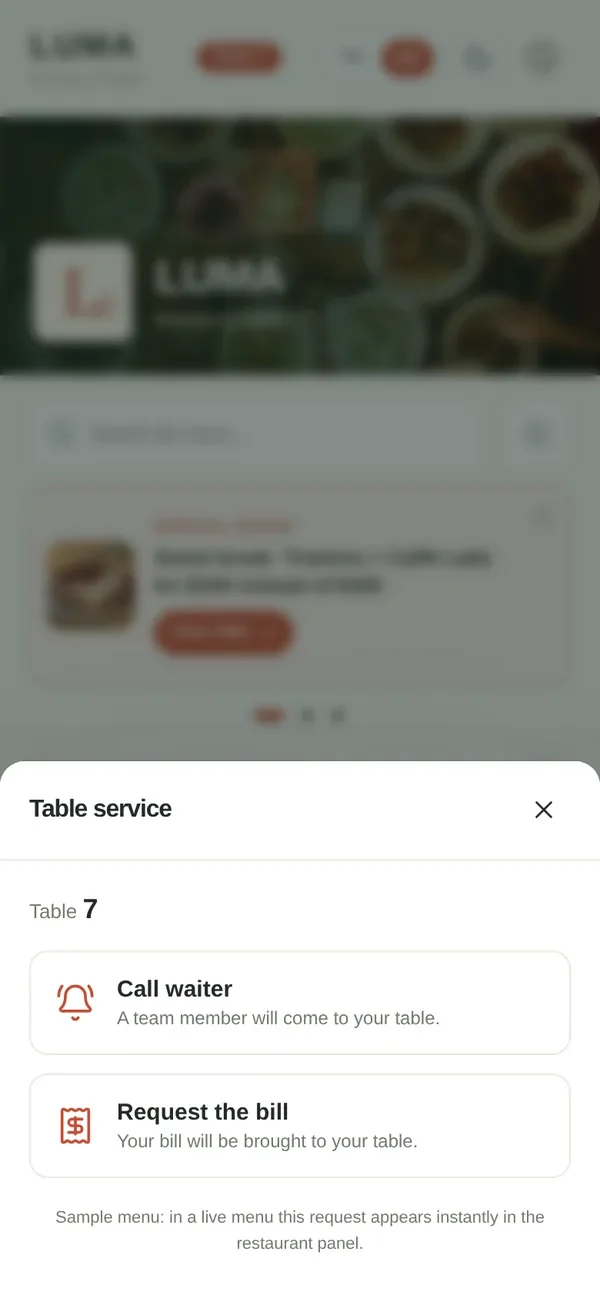
- From the same menu the guest can call the waiter or ask for the bill; waiter, kitchen and till screens are separate, and each team member signs in with their own name and PIN.
- In venues that use one shared code, the menu asks for the table number and remembers it for a while.
- Menuvola Orders does not take payments or issue fiscal receipts; you settle the bill at the till with your own card terminal, and the system records the payment type.
- Menuvola Orders is included in the Premium plan. You can compare the plans here.
Frequently asked questions
Do guests need to download an app to order with a QR code?
Not with web-based systems. The guest scans the code on the table with the phone camera, the menu opens in the browser and the order is sent from the same page. A system that asks for no account and no app gets more use, especially from tourists and first-time guests.
Does QR ordering replace the waiter?
No. QR ordering speeds up the order-taking step; service, recommendations, solving problems and the bill are still the team's job. The healthiest model is a mixed one: orders sent by guests through the QR code go through waiter confirmation, and the waiter can also enter orders from their own phone for tables that prefer to order in person.
How do you prevent orders for the wrong table or prank orders?
Three measures work best together: a QR code specific to each table, waiter confirmation before an order reaches the kitchen, and accepting only one pending order from the same phone at a time. Letting unconfirmed orders expire automatically after a set time also stops them piling up.
Can the QR menu on the table replace the printed price list?
It depends on the rules where you operate. In Türkiye, after the October 2025 amendment, food and drink businesses may offer the price list at the table through a QR code, but must also show a physical price list if a guest asks, and the price list at the entrance is still required. In other countries, check your local price display rules.
Can guests also pay through the QR code?
It depends on the system. Some take online payments; others only carry the order, and the bill is settled at the till with the venue's own card terminal. With the second model your payment and receipt process does not change, so clarify this when you choose a system.
What happens to QR ordering if the internet goes down?
The guest side does not work without internet; if the guest's phone is on mobile data, the order can still be sent. In Menuvola, if none of the staff devices in the venue has been able to connect for a few minutes, QR ordering pauses temporarily and the guest is asked to tell the waiter. On the staff side, systems that store actions on the device and send them when the connection returns reduce disruption. A backup connection, such as a 4G router or a phone hotspot, is still a good precaution.
Sources
- Ministry of Trade of Türkiye — A new era for price labels (13.10.2025, in Turkish)
- Official Gazette of Türkiye — Regulation amending the Price Label Regulation (11.10.2025, no. 33044, in Turkish)
- Ministry of Trade of Türkiye — Amendment to the Price Label Regulation on service, table and cover charges (in Turkish)
- Ministry of Agriculture and Forestry of Türkiye — Allergen information in catering establishments (in Turkish)